Sender Reputation Cultivation

Published: 2016-05-20

The general process for an ISP to receive an email is:

Step 1: Check the connection. If the IP domain name is in the blacklist, it may be rejected directly at this step;
Step 2: Check the account. If the recipient address does not exist or the mailbox is full, it will be bounced back at this step;
Step 3: Email filtering. Different ISPs have different filters, which are the core technology for them to block spam;
Step 4: Based on the previous comprehensive judgment, deliver the email to the inbox, junk mail folder, or ISP black hole.

It can be seen that an email must go through strict filtering before it can possibly enter the contact's inbox.

In the third step of the above receiving process, the ISP will evaluate the reputation of the email based on the sending history and multiple feedback indicators from the recipient. The reputation evaluation has the following influencing factors:

1. Number of recipients for email sending
QQ Mail, NetEase Mail, Gmail and other ISPs have set limits on daily sending volume. However, if the enterprise has a good sending reputation, it will continue to obtain more sending quotas.

2. Number of email complaints
Nowadays, most mailboxes have a "Report Spam" button, which is recipient complaint. The attitude of domestic mainstream ISPs towards complaints is: Emails with particularly serious complaints will be blocked immediately, and such blocking means the complaint situation is very serious and irreversible.
The main reasons for complaints are: not knowing how to unsubscribe; not trusting the unsubscribe link; accidentally clicking report; forgetting to subscribe; sending too frequently, causing resentment; not interested in the email; sending purchased lists, friends' lists, or other company's members; poor design... These reasons may lead to complaints. Once complained, it is likely that the email will not be able to enter the contact's inbox. For example, Hotmail, if a contact complains or unsubscribes, do not send again. If you continue to send, Microsoft will think you are a spammer, and the batch of emails you send may go to the junk folder.

3. Spam traps
Spam Traps are email addresses owned by some ISPs and third-party organizations. These addresses will not actively register for any services. These addresses will be hidden in the code of some websites. Once you use software to crawl email addresses, you may catch these addresses. This is an email address specially used to collect spam - sending an email to such an address may cause your IP domain name to enter the blacklist. This trick is very effective for spam senders who crawl addresses, so it is called a honeypot address.
How to avoid it? First, standardize the way of address collection to ensure that all are actively registered; second, it is best to send a confirmation welcome email; third, regularly clean the list. Addresses that have not been opened for a long time are of no value to you and have risks, so clean them up.

4. Email bounce rate
There are two types of email bounces: soft bounces and hard bounces. Soft bounce: Due to temporary reasons, such as a full mailbox, sending delay or failure, temporary failure of the remote server, etc., the email cannot be delivered smoothly. Hard bounce: Due to permanent reasons, such as invalid, closed, or non-existent email addresses, the email cannot be delivered.
The bounce rate will also directly affect the ISP's evaluation of the email, and a high bounce rate may have a negative impact on the ISP's evaluation of the enterprise's email sending reputation.

5. User behavior feedback
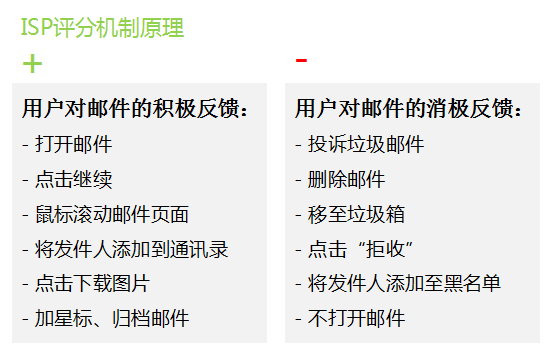
Practice has proved that ISPs, especially Chinese ISPs led by QQ and NetEase, increasingly judge whether an email is spam through user feedback on the email. Please refer to the following figure for the ISP user scoring principle:

From this figure, it can be seen that if users give positive feedback on your email, such as opening the email, clicking links, archiving, starring, etc., the ISP will consider you a reliable sender, and for your subsequent emails, the ISP is more willing to put them in the inbox. If the recipient gives negative feedback on your email, such as clicking ISP complaint, deleting the email, moving to the junk folder, etc., the ISP will judge that you are likely an unwelcome email sender, and subsequent emails will be put into the junk folder or blocked. User complaints at ISPs will seriously affect inbox delivery rates, and may even cause sending addresses and domains to enter ISP blacklists.

After doing all the above, test before each sending, monitor and adjust in real-time during sending, and summarize and optimize after sending. You will see that the proportion of emails entering the inbox will increase, and the effect of email marketing will also get better and better.

Register

Boss Edm makes email marketing more convenient, fast and easy to use!